Start with the right picture
The line work can only be as clear as the picture it comes from. Before you trace:
- Crop to the subject. Anything in the frame becomes lines, including the background.
- Look for contrast. An evenly lit subject against a plain background traces far better than a dim photo.
- Use the largest version you have. A small screenshot of a photo has already lost its edges.
Step by step in Tracesmith

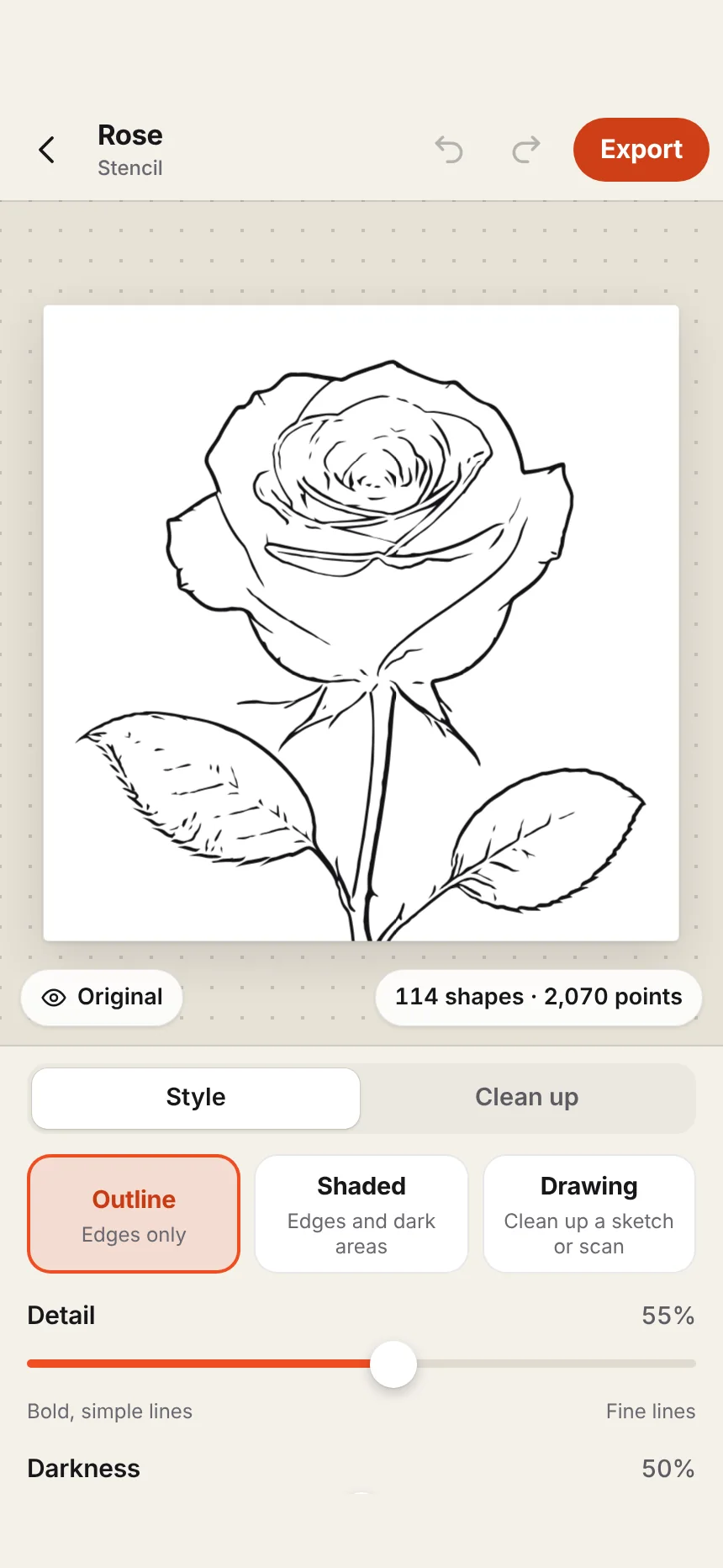
- Choose the job. Open Tracesmith, tap Stencil, then Choose a picture.
- Pick a style. Outline draws edges only, which is the usual starting point. Shaded also fills the dark areas, which helps you map shadows. Drawing is for a sketch or a scan you have already drawn: it cleans the paper away and keeps your lines.
- Set the detail. Drag Detail down for bold, simple shapes and up for fine lines. With Shaded, Darkness sets how much of the picture counts as shadow.
- Clean it up. Under Clean up, drop the small marks and specks that would only confuse the transfer.
- Set the size. Tap Export, choose PDF, and type the finished width of the tattoo in inches or centimetres. Measure the placement first.
- Mirror if you need to. Turn on Mirror if the printed side will go against the skin. See the note below.
- Print or save. Choose your paper size and export. A design wider than the paper is split across pages that are labelled and marked for joining.
To mirror or not
It depends on how the stencil reaches the skin, so test with a word before a real design.
- Through a thermal copier: the copier makes the transfer from your printed sheet, so print the design the right way round.
- Printed directly with stencil ink, or traced by hand onto transfer paper: if the side you printed or drew on is the side that touches the skin, the design flips. Turn Mirror on.
Getting better line work
- Trace twice. Export an Outline version for the lines and a Shaded version to plan the shadows. Free exports cover both.
- Simplify before you add. A stencil with fewer, surer lines transfers and holds better than a busy one.
- Expect to redraw the lines that matter. On a face, the eyes and mouth are where a traced line is most likely to need your hand. Print the stencil, correct it in pen, and scan it back in with the Drawing style.
What this is, plainly. Tracesmith finds the edges that are in your picture and draws them as clean lines, on your phone. It does not redraw the image with an AI model, so it will not invent lines that are not there or tidy a weak photo into a strong design. Try it on your own references with the three free exports each month.
Big pieces
For a back piece or a sleeve, set the full width and let the PDF tile across pages. Printing a stencil at full size covers the printer settings that keep the scale exact.
Other apps
Some stencil apps redraw the photo with an AI model on a server, usually for a monthly fee with a set number of stencils. We compare them, with their prices, in tattoo stencil apps for iPhone.